


MyFitnessPal and Lose It! are two of the most popular calorie-tracking apps, and they’re often compared because they solve the same basic problem: helping you log food, monitor calories, and stay on track with your nutrition goals. At a glance, both apps offer large food databases, barcode scanning, goal setting, and progress tracking, which makes them feel similar to many people looking for a reliable diet app.
The difference is less about whether they can track food and more about how they approach the experience. MyFitnessPal leans into being a broad, long-running nutrition platform with extensive database coverage and lots of integrations, while Lose It! tends to focus on a simpler, more streamlined calorie-counting experience that many users find easier to stick with day to day.
If you’re deciding between them, the best choice usually comes down to fit: which app matches your habits, budget, and how much complexity you want in a tracker.
MyFitnessPal vs Lose It! — Full Comparison Table
| Category | MyFitnessPal | Lose It! |
|---|---|---|
| Core purpose | Nutrition and calorie tracking | Calorie tracking and weight-loss support |
| Best for | Users who want a broad nutrition app with many features and integrations | Users who want a simple, focused calorie tracker |
| Primary audience | Casual users, dieters, fitness users, people tracking macros | Weight-loss focused users, beginners, people who want simplicity |
| Ease of use | Powerful, but can feel busy | Generally simpler and more intuitive |
| Design style | Feature-rich and data-heavy | Cleaner, lighter, more focused |
| Main strengths | Huge food database, integrations, macro tracking, brand recognition | Ease of use, simpler logging, strong weight-loss focus |
| Main limitations | Many best features are behind premium; interface can feel cluttered | Fewer advanced features and fewer integrations than MyFitnessPal |
| Free version | Yes | Yes |
| Paid plan / pricing model | Free with premium subscription | Free with premium subscription |
| Platforms | iOS, Android, web | iOS, Android, web |
| AI features | Limited AI-style assistance depending on current app features | Limited AI-style assistance depending on current app features |
| Customization | Strong goal and tracking customization | Moderate customization, generally simpler |
| Integrations | Strong, including wearables and fitness platforms | Good, but usually less extensive |
| Offline access | Limited/offline entry support varies by platform | Limited/offline entry support varies by platform |
| Ratings | Generally strong, but mixed by recent subscription changes | Generally strong, often praised for simplicity |
| Common criticism | Too many features locked behind paywall; database accuracy varies | Less depth for advanced users; fewer integrations |
The biggest difference is that MyFitnessPal is built like a broad nutrition ecosystem, while Lose It! is built like a simpler calorie-loss tool. MyFitnessPal offers more depth and connectivity; Lose It! often wins on ease of use.
What Is MyFitnessPal?
MyFitnessPal is one of the best-known nutrition tracking apps, built to help users log meals, count calories, track macros, and monitor progress toward weight and health goals. It started as a calorie counter, but over time it has grown into a broader health and nutrition platform with recipe tools, exercise syncing, barcode scanning, and integrations with other fitness apps and devices.
What problem it solves is simple: it makes it easier to understand how much you’re eating and how that fits into your daily goals. For people trying to lose weight, maintain weight, build better food habits, or track macronutrients, MyFitnessPal offers a familiar all-in-one system.
What makes MyFitnessPal different is its scale. It has long been one of the biggest players in the space, so many users value its large food database, brand recognition, and wide compatibility with other health tools. That said, the app can feel busy, and some users find the best features increasingly tied to the premium plan.
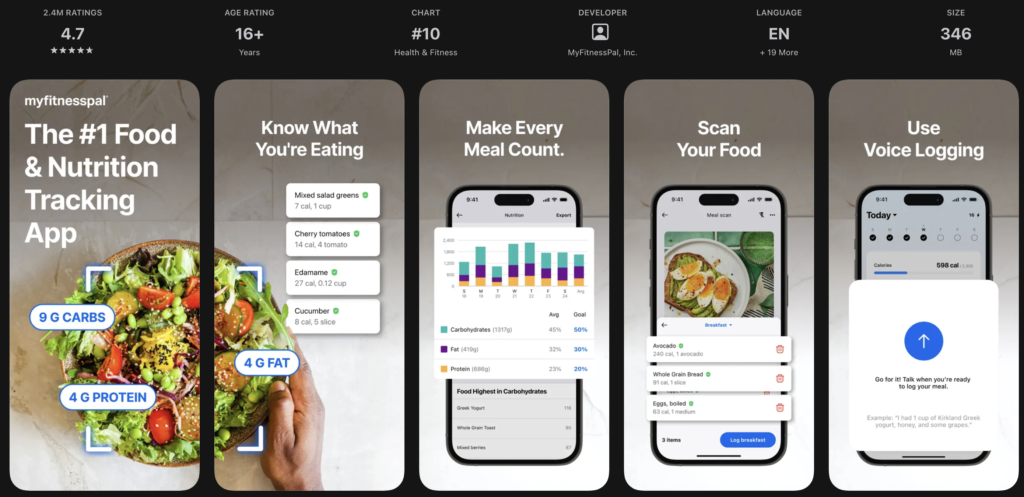
MyFitnessPal is best for people who want a powerful, well-established app and don’t mind spending time learning the interface. It can also work well for users who want to connect food tracking with exercise, wearables, and broader fitness routines.
Where it may fall short is simplicity and cost. New users sometimes feel overwhelmed, and if you only need basic calorie tracking, the app may feel heavier than necessary.
Key strengths of MyFitnessPal:
- Large and familiar food database
- Strong macro and nutrition tracking
- Wide range of integrations with fitness apps and devices
- Good for users who want more than basic calorie counting
- Established platform with broad cross-platform support
- Helpful for tracking long-term nutrition habits
What Is Lose It!?
Lose It! is a calorie-tracking and weight-loss app designed to make food logging feel straightforward and easy to maintain. Its core focus is helping users set calorie goals, track intake, and stay consistent without requiring a complicated setup.
It solves the same basic problem as MyFitnessPal, but with a lighter touch. Instead of trying to be a full nutrition ecosystem, Lose It! focuses on making calorie counting fast and approachable, which is why many users prefer it for everyday use.
What makes Lose It! different is its simplicity. The app is typically seen as cleaner and easier to navigate, especially for people who are new to tracking or who just want a practical weight-loss tool. Its design is usually considered less cluttered than MyFitnessPal’s, which can make the experience feel less intimidating.
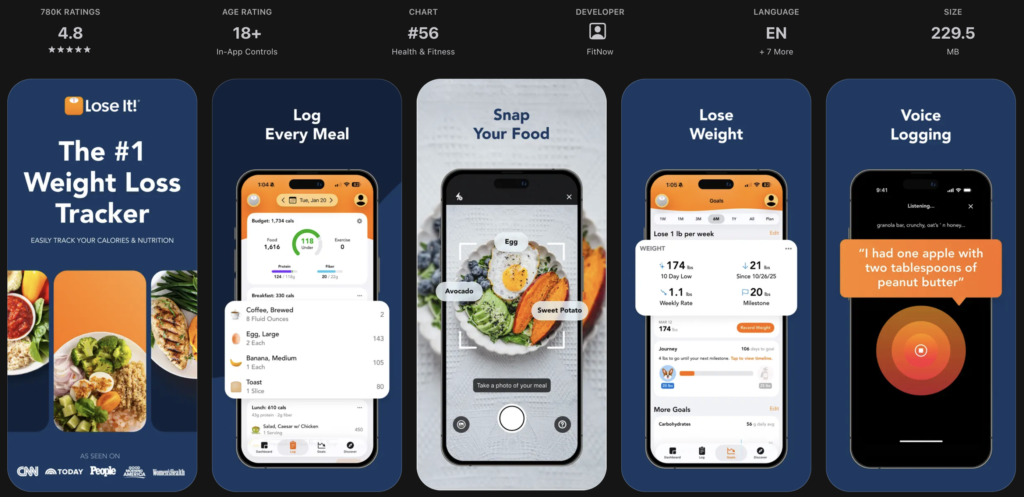
Lose It! is best for users who want a more focused app that helps them track food without a lot of extra complexity. It’s often a strong fit for beginners, casual dieters, and people who want to stay consistent with minimal friction.
Where it may fall short is depth. More advanced users may want more robust integrations, deeper nutrition tools, or a larger ecosystem than Lose It! typically provides.
Key strengths of Lose It!:
- Simple, easy-to-use calorie tracking
- Clean interface that is less overwhelming
- Strong focus on weight-loss goals
- Fast daily logging experience
- Good for beginners and casual users
- Lower-friction approach to habit building
MyFitnessPal vs Lose It!: Ratings and User Popularity
Both apps are widely used and generally well known, but they tend to earn praise for different reasons. MyFitnessPal usually has the larger overall user base and broader name recognition, which makes it feel more mainstream. Lose It! is also popular, but it often appeals more to users who specifically want a simpler calorie tracker.
In app store ratings, both apps commonly receive solid reviews, though ratings can shift over time based on subscription pricing, feature changes, and interface updates. The important thing is that ratings don’t just measure how “good” an app is in theory — they often reflect whether recent updates match what long-time users expect.
MyFitnessPal tends to get praised for its large database, strong feature set, and integrations, but it also draws criticism when users feel too much has been pushed into premium. Lose It! often receives positive feedback for simplicity and ease of use, though users sometimes wish it had deeper features or more advanced tracking tools.
In general, MyFitnessPal appears more mainstream and feature-heavy, while Lose It! feels more niche in the sense that it is more specifically aimed at people who want a straightforward calorie-counting experience.
MyFitnessPal vs Lose It!: Pricing Comparison
Both apps use a freemium model: you can start for free, but premium features require a subscription. The real difference is how much of the app feels usable on the free plan and how much value you get from upgrading.
| Pricing Category | MyFitnessPal | Lose It! |
|---|---|---|
| Free version | Yes | Yes |
| Free trial | Often available for premium features | Often available for premium features |
| Monthly plan | Subscription-based | Subscription-based |
| Yearly plan | Usually available | Usually available |
| Lifetime purchase | No standard lifetime option | No standard lifetime option |
| Best value for | Users who need broad features and integrations | Users who want a lower-cost, simpler tracker |
For budget-conscious users, Lose It! is often the easier app to live with because it tends to feel less heavy for basic calorie tracking. For people who want advanced nutrition tracking, broad integrations, and a more feature-rich platform, MyFitnessPal may offer more value despite the higher pressure to upgrade.
Free vs Paid Features
| Feature | MyFitnessPal Free | Lose It! Free |
|---|---|---|
| Core functionality | Basic food and calorie logging | Basic food and calorie logging |
| Reminders / notifications | Basic support | Basic support |
| Sync | Limited | Limited |
| Widgets | Limited / platform dependent | Limited / platform dependent |
| Repeating tasks / habits / automations | Limited | Limited |
| Calendar or third-party integrations | More limited than premium | More limited than premium |
| AI tools | Limited | Limited |
| Personalization | Basic goals and tracking | Basic goals and tracking |
| Export / sharing | Limited | Limited |
| Offline access | Limited | Limited |
In general, both apps reserve more advanced convenience features for paid plans. The free versions are usable, but premium is where each app becomes more fully featured.
Features Comparison: MyFitnessPal vs Lose It!
Ease of use
MyFitnessPal offers a lot, but that can make the app feel busier. Users who like having many options may appreciate the depth, but beginners sometimes need time to adjust.
Lose It! is usually easier to learn and use daily. The interface is more streamlined, so logging meals tends to feel faster and less distracting.
Who benefits more:
- MyFitnessPal: users who want depth and don’t mind complexity
- Lose It!: beginners and users who want quick, low-friction tracking
Planning / tracking / organization tools
MyFitnessPal generally provides stronger nutrition tracking, especially for people interested in macros, goals, and detailed food data.
Lose It! covers the essentials well, but it is more focused on calorie tracking than on deep nutrition analysis.
Who benefits more:
- MyFitnessPal: users tracking macros or detailed nutrition
- Lose It!: users focused mainly on calorie control and weight loss
Customization
MyFitnessPal usually gives users more flexibility in goal setting and tracking preferences. It’s better if you want to tailor the app around a broader health routine.
Lose It! offers customization too, but usually in a simpler format that keeps things easy to manage.
Who benefits more:
- MyFitnessPal: users who want more control
- Lose It!: users who prefer simplicity over options
Automation or AI features
Neither app is primarily known as an AI-first product, but both have added smarter logging and convenience features over time. MyFitnessPal’s larger ecosystem gives it an edge in automation through integrations.
Lose It! is more about quick manual logging and easy habit use than complex automation.
Who benefits more:
- MyFitnessPal: users who want connected tracking
- Lose It!: users who want straightforward daily logging
Integrations
MyFitnessPal is usually stronger here, especially for users syncing exercise, wearables, or other health tools.
Lose It! supports integrations too, but it is generally less expansive.
Who benefits more:
- MyFitnessPal: users with a connected fitness setup
- Lose It!: users who don’t need many outside connections
Cross-platform support
Both apps are available on iOS and Android, with web access also available. For most users, either app works across devices.
MyFitnessPal has long been strong as a multi-platform product, while Lose It! also offers the basics needed for syncing across phones and web.
Who benefits more:
- MyFitnessPal: users who want ecosystem breadth
- Lose It!: users who want a simpler cross-device experience
Design and interface
MyFitnessPal’s interface is functional but can feel denser because of the amount of information and features it presents.
Lose It! generally has the cleaner, more approachable design. This is one of the main reasons many users prefer it for day-to-day use.
Who benefits more:
- MyFitnessPal: users who prioritize feature depth
- Lose It!: users who prioritize a clean interface
MyFitnessPal vs Lose It! for Weight Loss
For weight loss specifically, both apps can work well because both help you build awareness around calorie intake. The difference is in how they support the habit.
MyFitnessPal is better if you want a more comprehensive nutrition and fitness tracking setup. It can be a strong choice if you’re logging not just calories but also macros, exercise, and long-term progress.
Lose It! is often better if your main goal is simply to stay consistent with calorie tracking. Many people find it easier to stick with because it feels less complicated, which can matter more than having extra features.
If you want the easiest path to daily consistency, Lose It! may be the better fit. If you want more data and ecosystem support, MyFitnessPal has the edge.
Real User Reviews: What People Like and Don’t Like
MyFitnessPal
Users often praise MyFitnessPal for its huge food database, macro tracking, and ability to connect with other fitness tools. It’s also appreciated by people who want a long-established, widely used app.
Common complaints usually focus on pricing, premium feature gating, and the feeling that the app can be more cluttered than it needs to be. Some users also point out that database entries are not always perfect because much of the content is user-generated.
Overall, the happiest users tend to be people who want a feature-rich nutrition tracker and are comfortable spending time in the app. Criticism is usually about pricing, complexity, or occasional data accuracy issues.
Lose It!
Users often like Lose It! for its simplicity, cleaner interface, and easy daily logging. Many reviews highlight that it feels less overwhelming than competing apps.
The most common complaints are about limited advanced features and the fact that more powerful tools may require premium. Some users also want better integrations or deeper nutrition analytics.
The happiest users are usually people who want a straightforward calorie tracker without too much extra clutter. Criticism tends to center on missing advanced features rather than major usability problems.
MyFitnessPal vs Lose It!: Pros and Cons
MyFitnessPal Pros
- Large food database
- Strong macro and nutrition tracking
- Many integrations
- Broad platform support
- Good for detailed tracking
- Well-known and widely used
MyFitnessPal Cons
- Can feel cluttered
- Best features often require premium
- Food database accuracy can vary
- Less appealing if you want simplicity
Lose It! Pros
- Simple and easy to use
- Clean, approachable design
- Strong for calorie-focused weight loss
- Faster day-to-day logging
- Good for beginners
- Less overwhelming than many competitors
Lose It! Cons
- Fewer advanced features
- Less robust integrations
- Not as deep for nutrition analysis
- May feel limited for power users
Which One Should You Choose — MyFitnessPal or Lose It!?
Choose MyFitnessPal if…
- You want the most established all-around nutrition app
- You track macros in addition to calories
- You use wearables or other fitness apps and want sync options
- You want broader customization and more advanced features
- You don’t mind a busier interface
- You’re okay paying for premium if needed
Choose Lose It! if…
- You want a simpler calorie tracker
- You prefer an app that feels easy to stick with every day
- You’re mainly focused on weight loss, not deep nutrition analytics
- You’re new to tracking food and want less complexity
- You value a cleaner interface
- You want a more straightforward experience overall
Final verdict:
Neither app is the universal winner. MyFitnessPal is better for users who want depth, integrations, and a more comprehensive nutrition platform. Lose It! is better for users who want a simpler, more focused calorie tracker that’s easier to use consistently. If your priority is advanced tracking, choose MyFitnessPal. If your priority is ease and consistency, choose Lose It!.
FAQs
Is MyFitnessPal better than Lose It!?
It depends on your needs. MyFitnessPal is better for advanced nutrition tracking and integrations, while Lose It! is often better for simplicity and ease of use.
Which app is easier to use: MyFitnessPal or Lose It!?
Lose It! is generally easier to use because it has a cleaner, more streamlined interface.
Which app is better for weight loss?
Both can work well for weight loss. Lose It! is often preferred for straightforward calorie tracking, while MyFitnessPal is better for users who want more detailed nutrition data.
Does MyFitnessPal have more features than Lose It!?
Yes, MyFitnessPal usually offers more depth, especially in integrations and nutrition tracking.
Which app is cheaper?
Both have free versions, but Lose It! is often seen as the more budget-friendly option for users who just need the basics.
Can I use both apps for free?
Yes, both MyFitnessPal and Lose It! offer free versions, though advanced features are typically reserved for paid plans.
Leave a Reply