

If you are comparing FoodNoms vs MyFitnessPal, the short answer is this: FoodNoms is the stronger pick for Apple-only users who want a cleaner, ad-free food log with more core tracking tools available for free, while MyFitnessPal is the better fit if you need Android, web access, a much larger food database, or full meal planning. As of October 20, 2026, FoodNoms is rated 4.7 out of 5 from 7.8K ratings on the U.S. App Store and has no Google Play version, while MyFitnessPal is rated 4.7 out of 5 from 2.4M U.S. App Store ratings and 4.4 out of 5 on Google Play, where the listing shows about 2.92M reviews.
Quick Summary
If you just want the bottom line, FoodNoms gives you a more focused nutrition tracker, lower paid pricing, and a family plan for Apple households. MyFitnessPal gives you far broader platform support, more food-database depth, a built-in community, and a stronger meal-planning tier through Premium+.
| Category | FoodNoms | MyFitnessPal |
|---|---|---|
| Best for | Apple users who want simple food logging, Apple Health support, no ads, and cheaper premium plans. | People who want iPhone, Android, and web access, a huge food database, and optional meal planning. |
| Platforms | iPhone, iPad, Mac, and Apple Watch only; no Android app. | iPhone, iPad, Apple Watch, Android, Wear OS, and website access. |
| Free plan value | Unlimited food tracking, barcode scanning, Apple Health export, reminders, and CSV export are included for free. | Food and exercise logging, recipes, macros, partner-app syncing, and basic goal tracking are free, but barcode scanning is Premium-only. |
| Paid tiers | FoodNoms+ plus a Family plan. | Premium and Premium+. |
| Biggest drawback | No Android or web version. | Free tier includes ads, and several popular logging tools are paid features. |
App Store and Google Play Ratings
Because store ratings change over time, these figures use the latest U.S. App Store and Google Play information available when this article was created. FoodNoms is not listed on Google Play, so there is no Android rating to compare.
| App | Platform | Rating | Number of Ratings/Reviews |
|---|---|---|---|
| FoodNoms | Apple App Store | 4.7/5 | 7.8K ratings |
| FoodNoms | Google Play | Unavailable | No Google Play listing |
| MyFitnessPal | Apple App Store | 4.7/5 | 2.4M ratings |
| MyFitnessPal | Google Play | 4.4/5 | About 2.92M reviews on the listing page |
What Is FoodNoms?
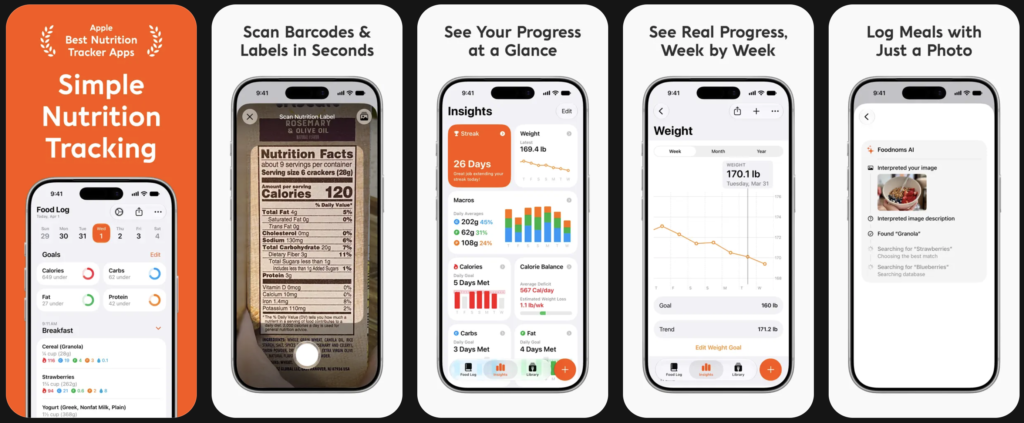
FoodNoms is a nutrition tracker from Algebraic Labs, LLC built for iPhone, iPad, Mac, and Apple Watch. Its official positioning centers on fast food logging, macro tracking, Apple Health support, widgets, and optional paid upgrades such as FoodNoms AI, detailed nutrient tracking, and Calibrated Energy. FoodNoms also says you can start without creating an account.
What Is MyFitnessPal?
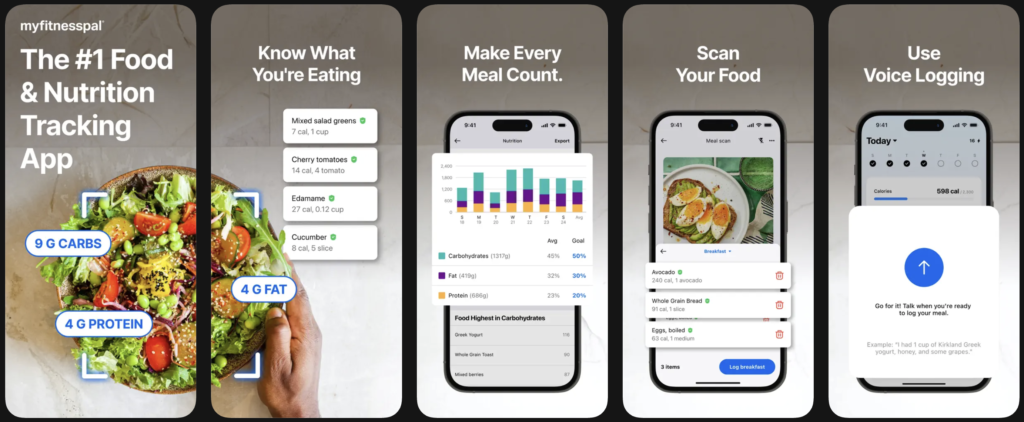
MyFitnessPal is a broader calorie, macro, and fitness platform from MyFitnessPal, Inc. Its official listings emphasize a 20.5M-plus food database, exercise tracking, water tracking, community features, partner-app connections, AI-assisted logging tools, and a higher-end Premium+ tier that adds meal planning and grocery-list features.
FoodNoms vs MyFitnessPal Features
1. Free logging tools
This is where FoodNoms has a real advantage. FoodNoms says its free version includes calorie and macro logging, the full food database, barcode scanning, reminder notifications, Apple Health export, and CSV export. MyFitnessPal’s free plan still covers food and exercise logging, recipes, macronutrients, printable reports, and partner-app links, but barcode scanning is listed as a Premium feature rather than a free one.
2. Premium tools
FoodNoms+ adds AI meal scanning, FoodNoms AI, 40-plus nutrients, Apple Health import, favorites, advanced goal settings, weekly and monthly charts, custom meal scheduling, and Calibrated Energy. MyFitnessPal Premium adds barcode scan, Meal Scan, voice logging, multi-day logging, macros by gram, different daily goals, food analysis, net carbs, intermittent fasting, and ad-free use.
3. Meal planning
MyFitnessPal clearly wins if you want the app to help decide what to eat. Premium+ includes meal planning, 1,500-plus recipes, grocery lists, grocery-shopping integration, and recipe sharing. FoodNoms has recipe import and nutrition-focused AI tools, but its official pages do not present it as a full meal-planner-and-grocery system in the same way.
4. Database size and logging depth
MyFitnessPal markets a much larger database, saying you can log from more than 20.5 million foods, including restaurant dishes. FoodNoms describes its database more conservatively as hundreds of thousands of foods with rich nutrition data from trustworthy sources. In practice, that means MyFitnessPal is more likely to win if database breadth is your top priority, while FoodNoms seems more focused on a cleaner logging experience.
Platform Support and Ecosystem
FoodNoms is an Apple-only app, with support for iPhone, iPad, Mac, and Apple Watch, and its help page says there is currently no Android app. MyFitnessPal works across iOS, Android, and the web, and its Premium help page says one subscription works across iOS, Android, and the website when you use the same account. If cross-platform flexibility matters, MyFitnessPal is the safer choice.
FoodNoms is also more Apple-centric in how it handles health data. The free plan includes Apple Health export, while FoodNoms+ adds Apple Health import. MyFitnessPal instead leans more on a larger ecosystem approach, highlighting 40-plus connected fitness trackers, smartwatches, and health apps, plus Wear OS support on Android.
Pricing and Subscription Comparison
Pricing can vary by country and by where you subscribe, so the comparison below uses the official U.S. pricing surfaces available at publication time. FoodNoms’ App Store listing also shows some higher legacy options, and its help page says those can be leftovers from past pricing tests with the same features. MyFitnessPal’s public Premium pages are clearer: Premium is $79.99 per year or $19.99 per month, while Premium+ is $99.99 per year or $24.99 per month.
| Plan | FoodNoms | MyFitnessPal |
|---|---|---|
| Free plan | Yes, with core logging tools and no ads. | Yes, but the free app contains ads. |
| Individual monthly plan | $5.99/month on the U.S. App Store listing. | Premium: $19.99/month. Premium+: $24.99/month. |
| Individual annual plan | $39.99/year on the U.S. App Store listing. | Premium: $79.99/year. Premium+: $99.99/year. |
| Family plan | $69.99/year for up to 6 people through Apple Family Sharing; monthly family plan also listed at $9.99. | No family plan is described in the official pricing/help materials reviewed here. |
| Free trial | FoodNoms+ Family includes a 7-day free trial for new subscribers. | Premium and Premium+ offer a 7-day free trial for eligible new users. |
For value alone, FoodNoms is far cheaper. If you only need food logging, barcode scanning, and macro tracking, its paid tier costs about half of MyFitnessPal Premium’s annual price and much less per month. MyFitnessPal becomes easier to justify when you want its database size, cross-platform access, or Premium+ meal-planning tools.
Ads, Privacy, and Account Setup
FoodNoms explicitly markets itself as having no ads or spam, and it says you can start without an account. MyFitnessPal’s free listing on both the App Store and Google Play indicates advertising, and its App Store privacy section says identifiers and usage data may be used to track you across apps and websites. Google Play also says the app may share location, personal info, and device or other IDs with third parties. That does not automatically make MyFitnessPal unsafe, but it does make FoodNoms the cleaner choice if minimalism and fewer marketing layers matter to you.
What Users Like
Recent FoodNoms App Store reviews consistently praise the app’s clean design, simple logging flow, Apple-native feel, barcode scanning, and responsive developer support. The reviews visible on the App Store also suggest that users appreciate how quickly bugs are addressed when they appear.
MyFitnessPal’s user feedback is broader because its audience is much larger. Recent iPhone reviews praise its extensive features, long-term usefulness, food logging, meal planning, and deep database. Recent Google Play reviews also show that many users still find it more capable than alternatives when it works well.
Common Complaints
FoodNoms’ main weakness is not a flood of billing complaints in the sources reviewed here; it is platform limitation. If you need Android, Windows, or a browser diary, FoodNoms is simply not built for that. App Store feedback also shows occasional bugs around feature access or scanning, although one prominent recent complaint was later marked fixed by the developer.
MyFitnessPal gets a wider range of complaints. On iPhone, recent reviews mention interface changes, premium features that used to be free, and occasional macro-reset or login frustrations. On Google Play, recent reviews mention recipe issues, diary-order problems, and the app sometimes jumping back to the main screen mid-entry. In other words, MyFitnessPal offers more power, but it also seems to create more friction for some users.
Pros and Cons
The pros and cons below are based on the official feature lists, pricing pages, store ratings, and recent user feedback reviewed for this comparison.
FoodNoms Pros
- Free barcode scanning and strong free-plan value
- Lower paid pricing than MyFitnessPal
- No ads
- Apple Health support and Apple Watch/Mac availability
- Optional family plan
- Can start without creating an account
FoodNoms Cons
- No Android app or Google Play presence
- No web dashboard for browser-based logging
- Smaller food database than MyFitnessPal
- Best fit mainly for Apple users
MyFitnessPal Pros
- Cross-platform support across iPhone, Android, Wear OS, and web
- Much larger food database
- More mature ecosystem of partner apps and connected services
- Premium+ adds real meal planning and grocery tools
- Huge number of ratings and reviews across both major app stores
MyFitnessPal Cons
- Higher monthly and annual pricing
- Free version contains ads
- Barcode scanning is paid, not free
- Recent reviews still mention bugs and friction around logging and settings
Who Should Choose FoodNoms?
Choose FoodNoms if you use only Apple devices, care about a cleaner interface, want free barcode scanning, and do not want to pay MyFitnessPal-level pricing just to unlock core logging tools. It also makes a lot of sense for households that want one shared family subscription across multiple Apple users.
Who Should Choose MyFitnessPal?
Choose MyFitnessPal if you need Android or web access, want the broadest food database, prefer a more full-service fitness ecosystem, or specifically want built-in meal planning and grocery-list features. It is also the easier recommendation for people who switch between devices or want one account that spans app and browser use.
Is FoodNoms Better Than MyFitnessPal?
There is no universal winner. FoodNoms is better for focused food tracking on Apple devices, especially if you want lower cost, no ads, and more free core features. MyFitnessPal is better if you want scale: more platforms, more foods, more fitness integrations, and a proper meal-planning layer through Premium+. The better app depends less on star ratings and more on whether you value simplicity or reach.
Final Verdict
For most iPhone-first users, FoodNoms is the more appealing day-to-day calorie tracker because it feels lighter, costs less, and keeps important tools like barcode scanning in the free tier. For mixed-device households, Android users, and people who want a huge database plus meal-planning extras, MyFitnessPal is still the more complete platform. If your question is simply “FoodNoms vs MyFitnessPal: which should I download first?” the practical answer is FoodNoms for Apple-only simplicity, MyFitnessPal for cross-platform flexibility.
Leave a Reply