
Some of the best apps for ADHD adults include Inflow for understanding ADHD patterns, Tiimo for visual planning and routines, Freedom and Forest for reducing distractions, Todoist and TickTick for task management, and Habitica or Finch for motivation and habit-building. Each of these apps supports a different part of daily life, from focus and scheduling to structure and emotional regulation.
Living with ADHD as an adult often means navigating challenges like time blindness, difficulty focusing, task overwhelm, and inconsistent motivation. Traditional productivity tools rarely work because they are not designed for how ADHD brains operate.
The good news: a new generation of apps is built specifically to support ADHD-friendly workflows — combining structure, flexibility, and even dopamine-driven motivation.
This guide breaks down the best apps for ADHD adults in 2026, categorized by real-life needs: focus, planning, task management, and mental clarity.
Best ADHD Apps Comparison
| App | Best for | Main strength | Possible downside |
|---|---|---|---|
| Inflow | ADHD support | ADHD coaching and practical guidance | Not ideal if you only want a planner |
| Tiimo | Visual planning | Visual schedules, routines, timers | Can feel too routine-focused |
| Freedom | Blocking distractions | Blocks apps and websites across devices | Doesn’t help with planning |
| Forest | Focus sessions | Simple gamified focus timer | Limited features beyond focus |
| Brain.fm | Focus audio | Music designed for concentration | Only useful if audio helps you |
| Endel | Sound support | Adaptive focus and relaxation soundscapes | Not a full productivity app |
| Sunsama | Daily planning | Combines tasks with calendar planning | Better for work than casual use |
| Morgen | Calendar management | Brings calendars and tasks together | May feel too complex |
| TickTick | Task management | Tasks, reminders, habits, Pomodoro | Can feel a bit busy |
| Todoist | Simple to-do lists | Clean, fast, easy task capture | Not ADHD-specific |
| Amazing Marvin | Custom workflows | Very flexible system | Setup takes time |
| Habitica | Motivation | Turns tasks into a game | Not for people who dislike gamification |
| Finch | Gentle motivation | Self-care and small daily habits | Weak for big projects |
| Whisper Memos | Quick idea capture | Voice notes turned into text | More for capture than organization |
| Audionotes | Smart note-taking | AI summaries from voice and text | Can feel excessive for simple notes |
| Notion | All-in-one workspace | Flexible for notes and tasks | Easy to overcomplicate |
| Lunatask | Life management | Tasks, habits, notes, mood tracking | Too broad for some users |
Why standard productivity apps often fail for ADHD
Most productivity tools are built around the idea that people have consistent motivation, can follow tasks step by step, and have a strong sense of time. That’s usually not how ADHD works.
For ADHD, tools need to be simpler and more flexible. They should be quick and easy to use, help you remember things with reminders or visual timelines, create some sense of urgency or reward (like timers or gamification), and allow for flexible structure instead of rigid systems.
Best Apps for Understanding ADHD
Inflow
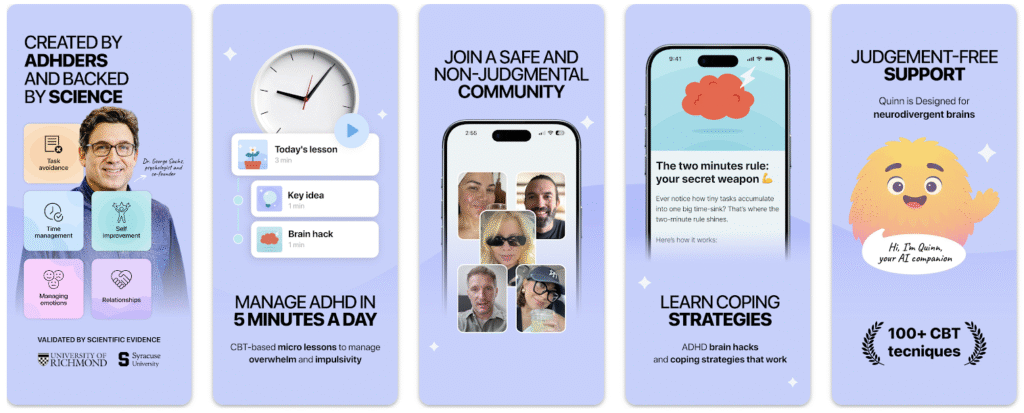
Inflow is one of the most well-known apps built specifically for people with ADHD. Instead of acting like a basic productivity tool, it focuses on helping adults understand how ADHD shows up in daily life. The app combines behavioral science, including CBT-based techniques, with short lessons, practical exercises, and structured guidance.
What makes Inflow stand out is its focus on patterns — procrastination, overwhelm, emotional regulation, and consistency. The content is broken into small, manageable pieces, which makes it easier to stay engaged.
Key features:
- ADHD-specific learning modules
- guided routines and habit building
- coaching-style exercises
Best for: adults who want to understand their ADHD and build better habits, not just manage tasks.
Best ADHD Apps for Focus and Distraction Control
Freedom
Freedom is designed to help users cut off distractions before they take over the day. The app blocks distracting websites, apps, or even the internet across multiple devices, making it easier to stay on one task without constantly switching tabs or reaching for your phone. For adults with ADHD, this can be especially helpful because it reduces the chance of impulsive app-checking or falling into distraction loops.
One of Freedom’s main strengths is that it works across devices, so it can support focus not just on your laptop, but also on your phone and tablet. It can also be used for scheduled focus sessions, which helps create more structure around work or study time.
Key features:
- blocks distracting websites and apps
- works across multiple devices
- scheduled and recurring focus sessions
Best for: deep work and preventing distraction loops.
Forest
Forest makes focus feel more interactive by turning it into a simple game. When you start a focus session, you plant a virtual tree. As long as you stay off your phone and remain focused, the tree keeps growing. If you leave the app too soon, the tree dies. It’s a small idea, but for many users it creates just enough motivation and accountability to stay on task.
The app is especially useful for short focus sessions, daily study blocks, or anyone who responds well to visual progress and light gamification. It does not try to be a full productivity system, which is also part of its appeal — it stays simple and easy to use.
Key features:
- gamified focus timer
- visual progress through growing trees
- simple and low-pressure interface
Best for: light gamification and short focus sessions.

Brain.fm / Endel
Brain.fm and Endel are audio-based tools designed to support concentration through sound. Instead of using traditional playlists, these apps generate focus-oriented soundscapes meant to help users stay engaged, reduce mental restlessness, or create a better environment for work. For some adults with ADHD, background audio can make it easier to concentrate, especially during repetitive tasks or moments of low motivation.
Brain.fm is more focused on music designed for concentration, while Endel offers adaptive soundscapes for different states like focus, relaxation, or sleep. Neither app replaces a planner or task manager, but they can work well as support tools alongside other ADHD apps.
Key features:
- AI-based soundscapes for focus
- different modes for concentration, relaxation, or sleep
- helpful as a background support tool during work sessions
Best for: people who need audio stimulation to concentrate.
Best Apps for Time Management and Planning
Tiimo
Tiimo is one of the most ADHD-friendly planning apps because it replaces traditional task lists with a visual timeline. Instead of just showing what needs to be done, it helps users see how their day is structured in time. That can be especially useful for adults with ADHD who struggle with time blindness, transitions, or estimating how long things will take.
The app is designed to feel simple and supportive rather than overwhelming. It focuses on routines, reminders, and visual planning, which makes it easier to build structure without creating another stressful system to manage. For many users, Tiimo works well for daily planning, morning routines, and staying oriented throughout the day.
Key features:
- visual schedules
- reminders and timers
- simple, clean interface
Best for: structuring daily routines without overwhelm.
Sunsama
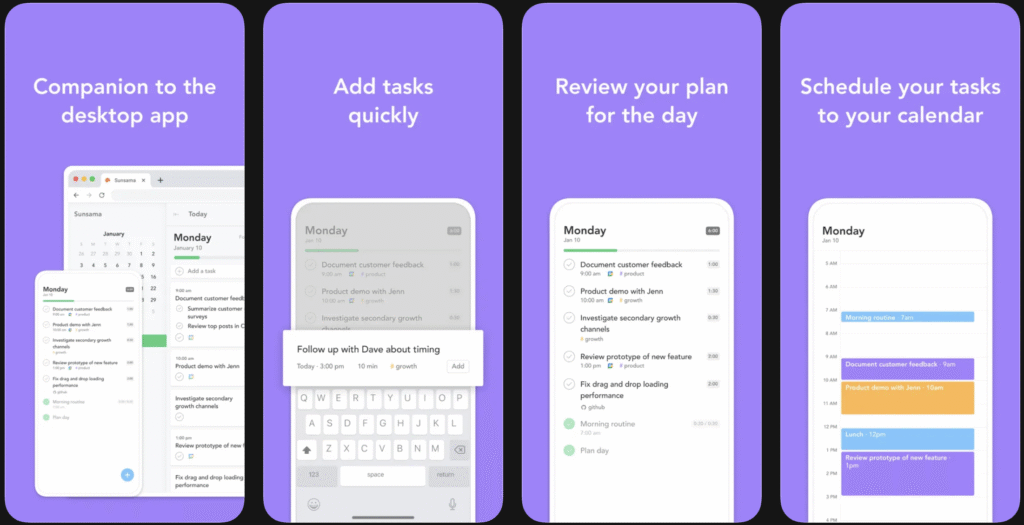
Sunsama is a planning app that combines tasks with calendar scheduling, helping users turn loose to-do lists into a more realistic daily plan. Instead of encouraging people to keep adding tasks endlessly, it pushes them to think about what can actually fit into one day. That makes it especially useful for adults with ADHD who tend to overestimate their capacity or feel overwhelmed by an overloaded task list.
One of Sunsama’s strengths is that it creates a more intentional planning process. It works well for people balancing work, meetings, and personal tasks, and it helps bring more structure to the day without being as rigid as some traditional productivity systems.
Key features:
- task and calendar integration
- guided daily planning
- realistic workload management
Best for: professionals managing multiple responsibilities.
Morgen
Morgen is built for users who need to manage tasks and calendars across multiple platforms in one place. It brings together different calendars, supports time blocking, and helps users plan more clearly without jumping between tools. For adults with ADHD, this can reduce mental clutter and make it easier to see the full picture of the day or week.
The app is especially helpful for people who work across different systems, accounts, or time zones. By consolidating scheduling into one interface, Morgen can support better planning and reduce the friction that comes from scattered information. It is a stronger fit for users with more complex scheduling needs than for someone who just wants a very simple planner.
Key features:
- multiple calendar integration
- time blocking across platforms
- unified view of tasks and schedules
Best for: users working across different time zones or systems.
Best Apps for Motivation and Habit Building
Habitica
Habitica turns everyday tasks and habits into a role-playing game. Instead of using a standard checklist, the app rewards users for completing tasks, building streaks, and making progress like a game character. For adults with ADHD, this can make routine responsibilities feel more engaging and less repetitive.
The app is especially helpful for people who struggle with boredom, low motivation, or starting tasks that feel dull. By adding rewards, progress, and a sense of achievement, Habitica creates extra dopamine around productivity. It is not the most traditional planning tool, but that is exactly why it works well for some users.
Key features:
- gamified tasks and habit tracking
- rewards and progression system
- motivation through streaks and goals
Best for: users who need more excitement and external motivation to stay consistent.
Finch
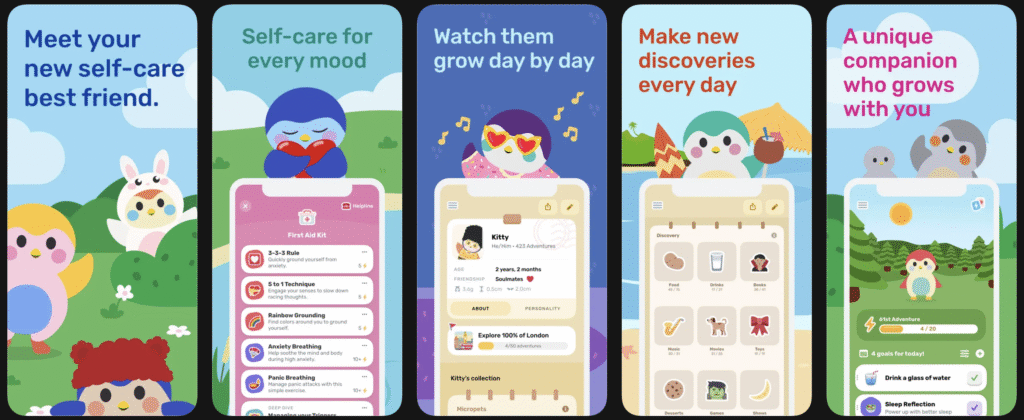
Finch is a self-care and habit-building app built around a virtual companion that grows as you complete small daily actions. The app focuses on gentle encouragement rather than pressure, which can make it a good fit for adults with ADHD who feel overwhelmed by strict productivity systems.
What makes Finch different is its supportive and low-stress approach. It helps users build routines through small steps, daily check-ins, and positive reinforcement. Instead of pushing for maximum efficiency, it focuses more on consistency, emotional support, and building momentum over time.
Key features:
- virtual companion that grows with progress
- daily self-care and habit prompts
- gentle, encouraging structure
Best for: users who want a softer and more supportive approach to motivation.
Focus Friend
Focus Friend is designed to make focus sessions feel more interactive and engaging. It adds a gamified accountability layer to productivity, which can be useful for adults with ADHD who struggle to stay interested in repetitive tasks or work sessions.
Rather than acting as a full task manager, the app is more about helping users stay present during focus time. It works best as a support tool alongside a planner or to-do app, especially for people who benefit from external structure and a stronger sense of engagement while working.
Key features:
- gamified focus sessions
- accountability-based structure
- simple support for staying on task
Best for: users who struggle with motivation and consistency.
Best Apps for Capturing Thoughts and Ideas
Whisper Memos / Audionotes
Whisper Memos and Audionotes are useful for adults with ADHD who need to capture thoughts quickly before they disappear. Instead of stopping to type everything out, these tools let users record ideas by voice and turn them into text or structured notes. That makes them especially helpful for fast-moving minds, sudden bursts of inspiration, or moments when typing feels like too much effort.
These apps are less about full productivity systems and more about reducing friction in the moment. They help users capture ideas, reminders, or rough thoughts before they get lost. For people with ADHD, that kind of low-effort input can make a big difference, especially when ideas come quickly or unpredictably.
Key features:
- voice-to-text note capture
- fast idea recording without typing
- helpful for organizing thoughts into written notes
Best for: fast-moving minds and idea capture.
All-in-One ADHD Productivity Systems
Notion
Notion is a flexible workspace that can be used for notes, tasks, databases, calendars, and personal systems. For adults with ADHD, it can be appealing because it allows everything to live in one place instead of being spread across multiple apps. Users can build planners, dashboards, habit trackers, and note systems based on what works best for them.
At the same time, Notion can be overwhelming because it requires setup and ongoing organization. It works best for people who enjoy customizing systems and want more control over how their workspace looks and functions. It is powerful, but not always the easiest starting point for someone who needs a very simple tool.
Key features:
- flexible system for notes, tasks, and planning
- customizable pages, databases, and templates
- supports all-in-one organization
Best for: users who want one customizable space for everything and do not mind setting it up.
Lunatask
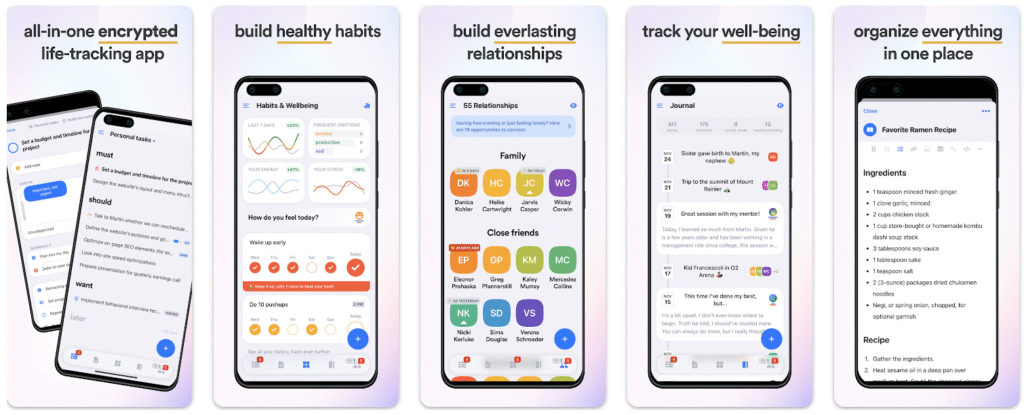
Lunatask is an all-in-one app that combines task management with journaling, mood tracking, habits, and notes. It is designed to support both productivity and personal well-being, which can make it a strong option for adults with ADHD who want more than a standard to-do list.
One of Lunatask’s main strengths is that it connects different parts of daily life in one interface. Instead of separating tasks, emotions, and routines into different apps, it brings them together in a way that can feel more manageable. This makes it a good fit for users who want structure but also need space for reflection, mood awareness, and habit support.
Key features:
- combines tasks, notes, habits, and journaling
- mood tracking and personal reflection tools
- ADHD-friendly all-in-one interface
Best for: users who want to manage productivity and well-being in one place.
How to Choose the Right ADHD Apps
When choosing ADHD apps, it is usually better to keep things simple instead of building a large system with too many tools. Downloading every highly rated app may seem helpful at first, but in practice it often creates more clutter, more notifications, and more decisions to make. For many adults with ADHD, that quickly becomes overwhelming.
A better approach is to build a small, sustainable app stack based on your actual needs. In most cases, one app for planning, one app for focus, and one app for tasks or notes is enough. For example, you might use Tiimo for visual planning, Freedom or Forest for focus, and Todoist or Notion for managing tasks or capturing information. This kind of setup gives you support in the areas that matter most without turning productivity into another complicated system to maintain.
The goal is not to find the perfect app for everything. It is to find a few tools that work well together and feel easy to return to consistently. If an app feels too complex, too demanding, or too easy to ignore, it may not be the right fit, even if it has a lot of features.
A simple recommended structure:
- 1 app for planning
- 1 app for focus
- 1 app for tasks or notes
Too many tools can create more overwhelm, so simplicity is usually the better strategy.
Final Thoughts
The best ADHD app is not necessarily the most advanced or the most popular one. It is the one that fits naturally into your daily life and is easy enough to use consistently. A simple tool you return to every day is usually far more helpful than a powerful app you stop using after one week.
When evaluating ADHD apps, it helps to look for tools that feel intuitive, reduce mental load, and support the way your brain already works. The right app should make tasks feel more manageable, not more complicated. It should help you create structure without adding unnecessary pressure.
ADHD productivity is not about forcing yourself into rigid systems or trying to work like everyone else. It is about designing an environment that reduces friction, supports memory, improves focus, and makes it easier to follow through. The right tools will not solve everything on their own, but they can make daily life feel a lot more workable.
Leave a Reply